Loading…
 Settle Fairly
A private conflict mediation and decision-making app for iPhone and iPad
Work it out. Without the fight.
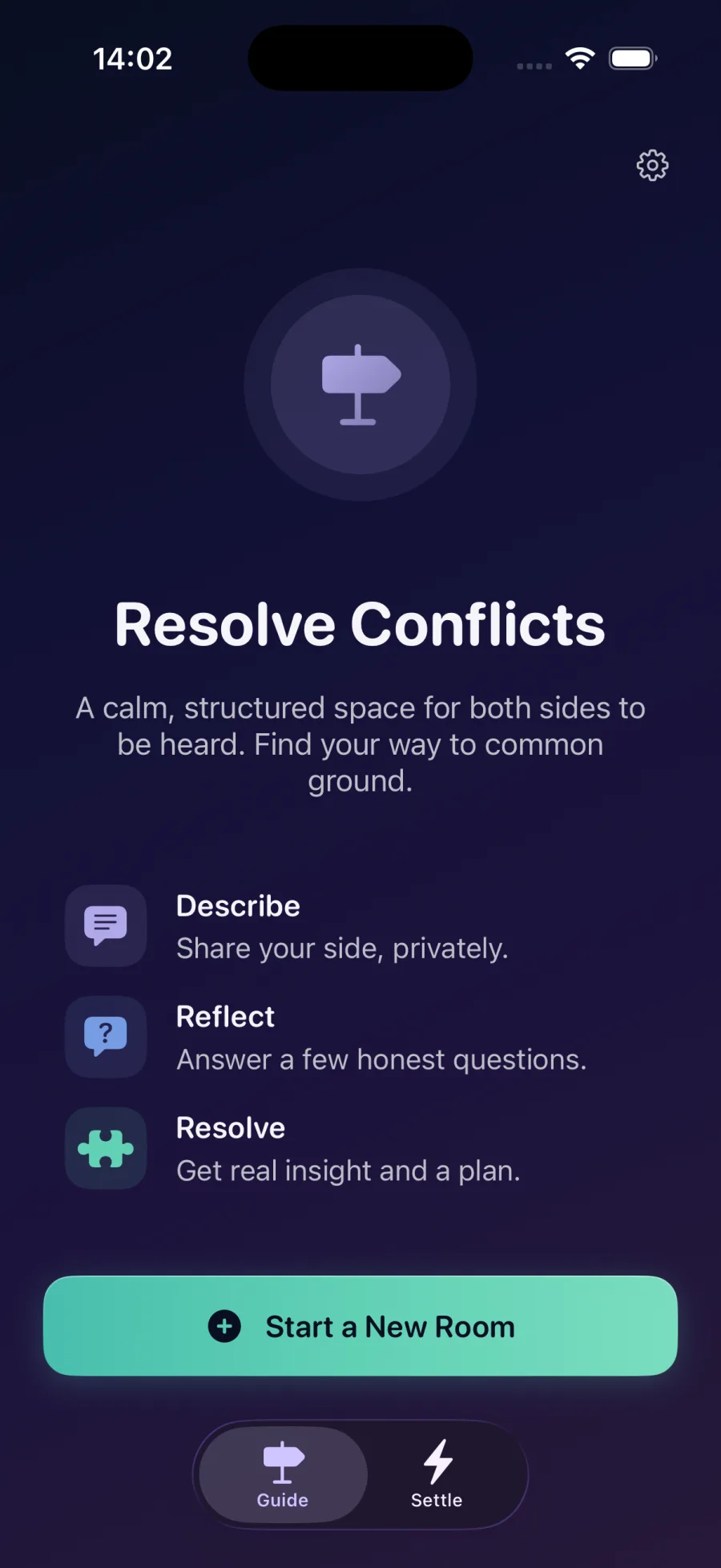
In Guide mode, two people each write their side alone, and your side is never shown to the other person. You both get one neutral summary, the root cause underneath it, and a plan you can both follow.
Or settle a single decision, on your own or with up to six people.

The problem with one side of the story
Every account of an argument has one narrator. When you explain what happened, you are the most reliable source on what you felt, and the least reliable one on what the other person meant. The same is true of them, about you.
That gap is where this gets stuck. Usually not in the disagreement itself, but in two people each holding half of it, with neither able to see the other half.
Settle Fairly has both halves. That is the whole of it.
Why this isn't the same as talking it through with a chat assistant
Talking it through with a general assistant is genuinely useful. It will listen for as long as you want, it will help you find words, and it will often notice something you missed.
But it only ever has your half. One narrator, and that narrator cannot tell it what the other person actually meant. So it can help you think. It cannot weigh two accounts against each other, because the second one was never in the room.
That is the part we do, and it is why the two work well together. Think it through wherever you like. Then bring both sides here.
How it works
Two ways forward: work something out with one other person, or settle a single decision, on your own or with up to six people.
Guide
Work it out together
- 1Set a goal and invite the other person.
- 2Each of you vents freely. Your words are never shown to the other.
- 3Get a shared, neutral summary, then go deeper: the root cause underneath the argument, and an actionable plan.
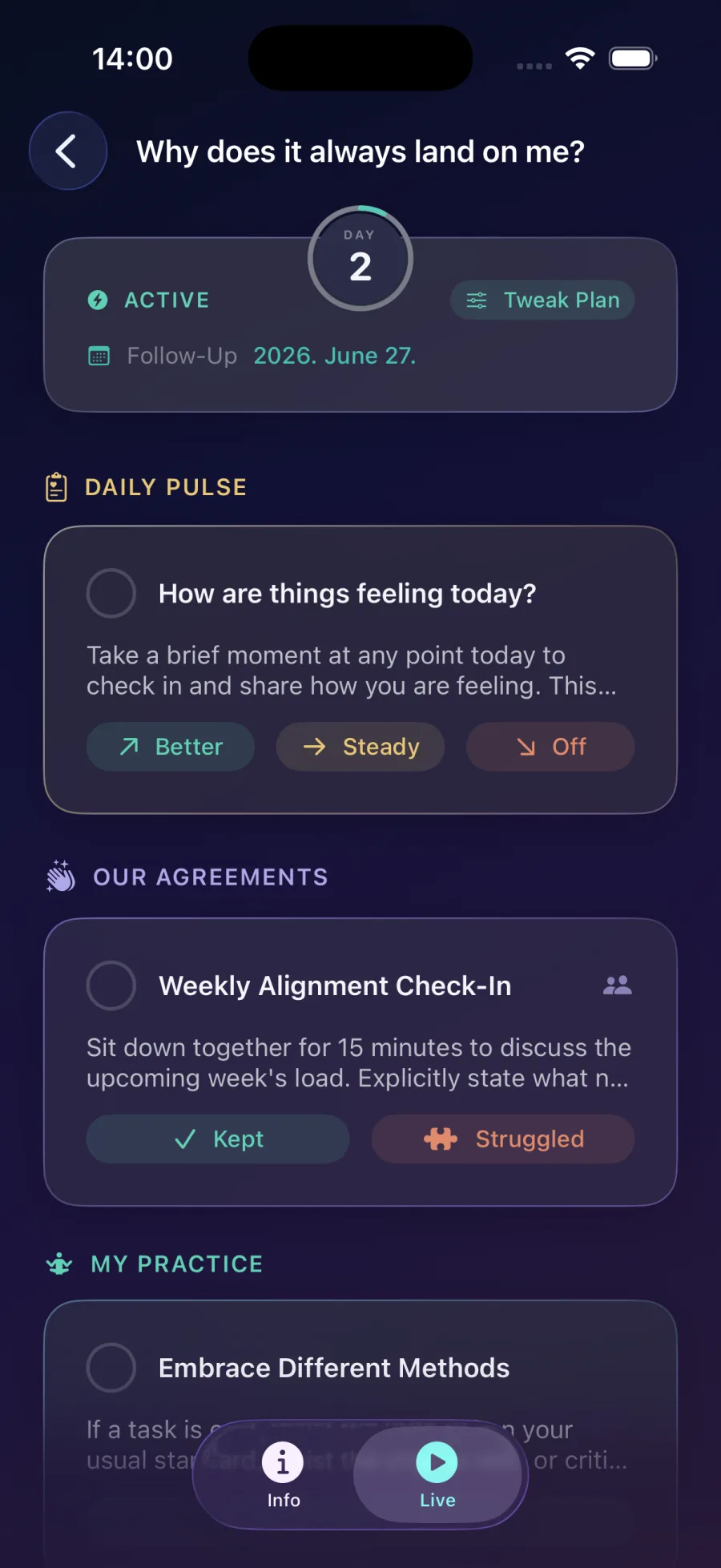
- 4Turn it into a living plan with a Daily Pulse, shared agreements, and follow-up sessions, chapter after chapter.
Settle
Settle a decision
- 1Frame the choice as two competing solutions.
- 2Answer honest questions, solo or with up to 6 people (blind, if you want).
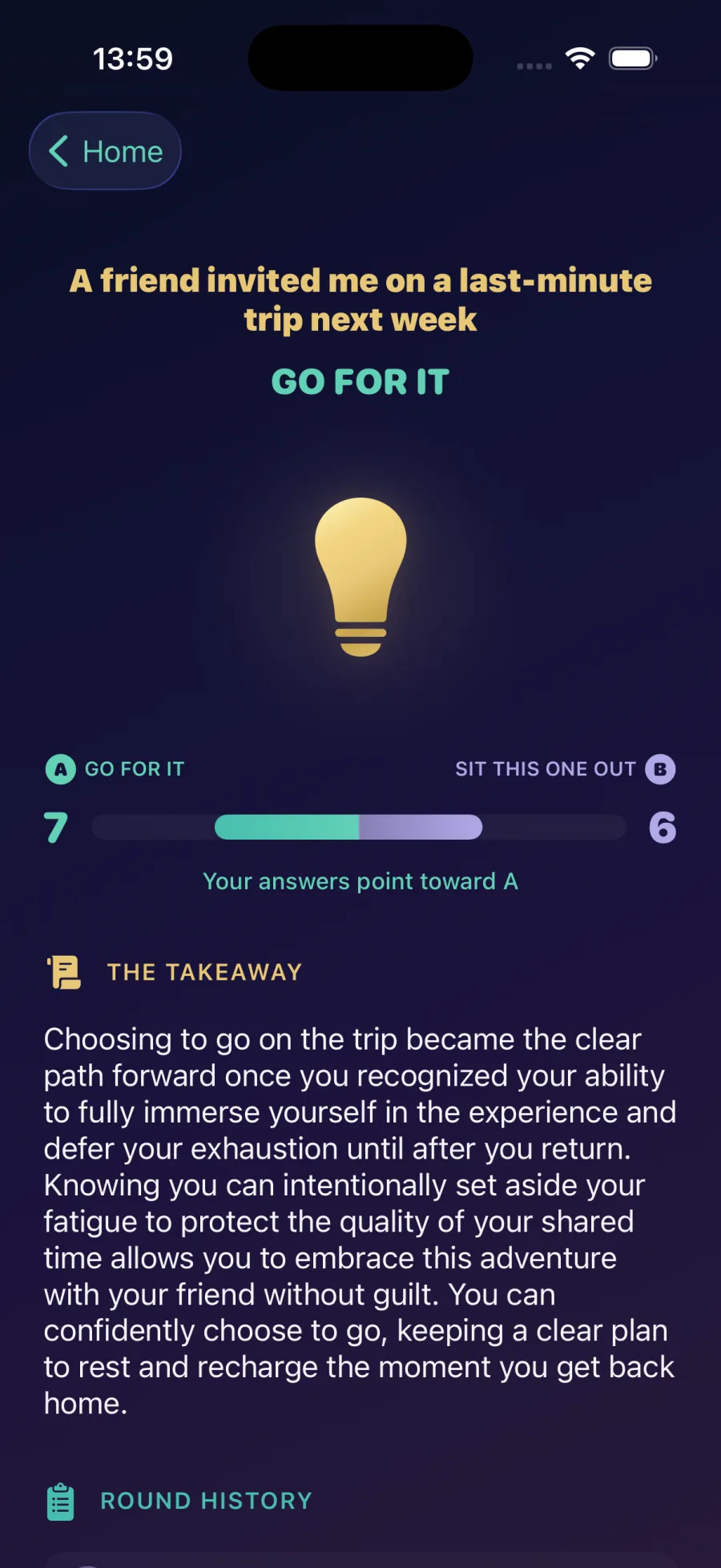
- 3Watch each answer pull conviction toward the stronger side.
- 4Land on The Takeaway: one clear answer, and why it won.
What you get
The neutral summary is free, and so are quick decisions. The root cause and the plan arrive together, as the analysis. The timed parts open up in live mode.
Neutral summary
One shared account of the disagreement, written from both sides at once. It is the first thing you both see, and it is free.
Root cause
The true origin of the disagreement, past the he-said/she-said. Often it isn't what you were arguing about: anger can turn out to be a fear of being abandoned.
Actionable plan
Three steps written for your situation. It comes as part of the analysis, alongside the root cause, rather than something you set up yourself.
Our Agreements
The commitments you both made, kept as timed tasks so neither of you has to be the one who remembers. Opens up in live mode.
My Practice
Your own habit or exercise for the same situation, private to you, on the same timed footing as the agreements.
The Daily Pulse
One tap a day: Better, Steady or Off, plus a note if you want. It's less for you to read than for the analysis to read, and if things start slipping it can bring your follow-up forward.
Follow-Up Session
How a chapter ends. It runs the same flow as the beginning, and then you either close there or open a new chapter. Every chapter is closed by one.
The Takeaway
For a Settle: one clear answer to the question you asked, and why it came out that way.
Who it's for
The common thread isn't that people disagree. It's that saying the thing directly is costly, so it either doesn't get said or it doesn't get heard. Nearly every one of these is a miscommunication underneath.
Partners
Where things escalate fastest. A sentence meant one way lands another, and a minute later you're arguing about the argument instead of the thing.
Roommates
Nobody wants to be the one who brings up the mess, or to tell someone how to change. And on the rare occasion it does get said, it usually doesn't hold for long.
Family
A kid who won't say the hard thing, or says it and isn't believed. A parent who can't find a way to ask for a change that doesn't land as criticism.
Friends
The thing you decided wasn't worth the friction of saying. Which is why it's still sitting there months later.
Colleagues
A working relationship you have to keep. Disagreements slide into credentials and reputation, “I've been an engineer for ten years”, and then nobody can afford to back down.
Privacy by Design
Your privacy isn't just a feature. It's the foundation of everything we build.
In Guide, your side stays yours
The only thing the other person sees is the title. A short goal is optional. Nothing else either of you writes is ever shown to the other.
In Settle, blind mode is a switch
Answers are shared by default, since you're all weighing the same two options. Turn blind mode on and your answers stay between you and the neutral summary.
Two keys, and we hold neither
One is a shared key that travels inside your private invite link. The other is your own personal key, created on your phone. Neither is ever stored on our servers, so nobody can read your most sensitive writing on their own.
Deleted after 30 days
A Guide is deleted 30 days after you create it, or 30 days after the last follow-up. A Settle is deleted 30 days after the last activity. Deletion is permanent, and we keep no backups to restore from. Export anything you want to keep as a PDF first.
No name, no email, no tracking
We never store your name, email address or phone number. This site has no analytics and no advertising trackers, and we don't sell data.
Why we don't call this end-to-end encrypted
Because it isn't, and it can't be. To write a summary that reflects both sides, the server has to read both sides. Anyone promising end-to-end encryption and a result drawn from both accounts is promising two things that don't fit together.
What happens instead: your writing is encrypted with two keys and we store neither of them. On our servers the keys are held in memory only and never written to disk. The server produces the result, then locks everything back up. Your answers never reach the other person.
That is a product guarantee rather than a mathematical one, and we would rather say so plainly than overstate it.
Not a replacement for professional help
Settle Fairly is a communication tool, not a substitute for therapy, mediation or legal advice, and it isn't for emergencies. If a situation looks like one for a professional, the app says so. What you get back is guidance to help you think, never a verdict.
Before you start
Can this help if the other person won't talk about it?
Partly, and the limit is worth being straight about. Guide needs you both to write something, so if they won't, there is nothing to weigh your side against. What you can do alone is a Settle: frame the decision in front of you, answer a few honest questions, and get a clear answer by yourself. Plenty of people start there and invite the other person later, once there is something concrete to talk about rather than a whole argument to reopen.
How is this different from asking ChatGPT about my situation?
A chat assistant only ever has your half of it. It has one narrator, and that narrator cannot tell it what the other person actually meant. It will help you find words and often spot something you missed, which is genuinely useful. What it cannot do is weigh two accounts against each other, because the second one was never there. That is what this is for. The two go together: think it through wherever you like, then bring both sides here.
What if we've had the same argument a hundred times?
That is the case it was built for. One summary rarely settles a recurring argument, so Guide does not stop there. It looks for the root cause underneath the repetition, which is often quite different from the thing you argue about: anger that turns out to be a fear of being abandoned, for instance. Live mode then turns it into something ongoing, with Our Agreements, My Practice, a Daily Pulse and a follow-up date you set together. Each chapter closes with that follow-up, and you can open a new one after it.
Do we both have to sign up?
There is no sign-up. We never ask for a name, an email address or a phone number. The person you invite can take part straight from the link in their browser, with no account and no app at all. You start one from the iPhone or iPad app, which ties the session to your Apple ID without storing a profile.
Is it free?
The neutral summary is free, and so are quick decisions. The root cause and the plan arrive together as the analysis, and the timed parts open up in live mode. Billing and refunds are handled by Apple.
Frequently Asked Questions
What kind of conflicts is Settle Fairly for?
Everyday disagreements between partners, roommates, friends, family, or colleagues, where both people want to sort things out but find it hard to talk directly. It works best when both sides are willing to engage honestly.
Can the other person see exactly what I wrote?
It depends which mode you're using, and the app always shows you up front. Every field carries a little "Shared" or "Kept" badge, so you're never guessing. In Guide (a guided conversation), the only thing the other person sees is the title you give your situation; a short goal is optional, and everything else you write stays private to you. In Settle (deciding between two options), the two options themselves are shown to both of you, since you're both weighing the same choice. Your backstory and answers are only shared if you leave that setting on. Turn on the private (blind) option and they're kept just between you and our neutral AI helper, so the other person only ever sees a balanced summary.
How is my data protected?
Everything you write is scrambled so it can't be read without the right keys, and there are two of them. One is a shared key that travels inside your private invite link. The other is your own personal key, which is created on your phone and never leaves it. Because no single person ever holds both, not the other participant and not us, your most sensitive writing can't be read by anyone on their own. Our server only unscrambles your words for a brief moment to write the summary and analysis, then locks them away again; we never keep your keys or a readable copy, and we never store your name, email, or phone number. After 30 days with no activity the server's copy is deleted for good, and from then on it lives only on your own device. That's also why a finished session can't be reopened from our side.
Is the AI reading or keeping my conversations?
To write the questions, summaries, and analysis, your words are sent to a specialist AI provider that works strictly on our behalf, under a contract that forbids using your content to train its models or for advertising. The provider doesn't keep your words for its own purposes, and no one at Settle Fairly sits and reads your sessions. And remember: what the AI gives back is guidance to help you think it through, never a verdict. What you do with it is always your call.
How long do you keep my data?
Only as long as it's useful, then it's deleted from our servers automatically. A Settle is deleted 30 days after the last activity: each time either of you does something, that clock resets, and once it's finished it counts 30 days from the end. A Guide is deleted 30 days after you create it, or, in live follow-up mode, 30 days after the last follow-up. This only clears our copy. Anything saved on your own phone stays with you, and before then you can always export a session, its analysis, or its result as a PDF to keep for yourself. Deletion from our side is permanent; we keep no backups to restore from.
I lost my room link, can I get back in?
First, the good news: if you joined in the app, you don't need the link at all. Your room is tied to your account and follows your Apple ID, so just open the app. The link only matters if you opened the room in a web browser and never joined in the app. We can't look it up for you, because we deliberately store nothing that ties a room to you by name, and that's what keeps it private. Try your browser history (type the room's title, or just "settlefairly", into the address bar) and check wherever the link or QR code was first shared. One thing to know: an invite can only be joined once, so if it's already been opened and continued on another device, the same link won't reopen it there. If it was never joined in the app and the link is truly gone, it can't be recovered.
What happens if I get a new phone or restore my device?
Your keys live in iCloud Keychain, so they travel with your Apple ID. Set up a new phone or restore one, and your active sessions (the ones still within their 30 days) reappear on their own, with nothing to copy across by hand. Older, finished sessions you've kept come back when you restore the device from an iCloud backup. Even if something can't be brought back on your side, the other participant still has their own copy and can read the results you made together for as long as the session lives on our server. For extra peace of mind, you can also export anything important as a PDF and keep it yourself.
How do I cancel my subscription?
Open the Settings app on your iPhone → tap your name → Subscriptions → Settle Fairly → Cancel Subscription. You can also reach this from within the app via Settings → Manage Subscription. Billing and refunds are handled by Apple.
Is this a replacement for therapy, mediation, or legal advice?
No. Settle Fairly is a communication tool, not a substitute for professional help, and it is not for emergencies. If you or someone else is in danger or in crisis, contact your local emergency services or a qualified professional. Where a situation may benefit from professional support, the app may gently suggest it.